
Almost daily, I read and watch stories from people who have been deactivated from platforms such as Instacart, Spark, Uber, Doordash, and beyond. Many full-time gig workers are caught off guard as there isn’t always a clear reason. Advanced algorithms and unfair reviews are two reasons. Additionally, algorithms punish workers for not accepting lower-paying jobs. Fortunately, advocacy groups are taking notice.
A group called PowerSwitch Action recently conducted an Uber driver survey and released a report based on their findings. Here are some highlights:
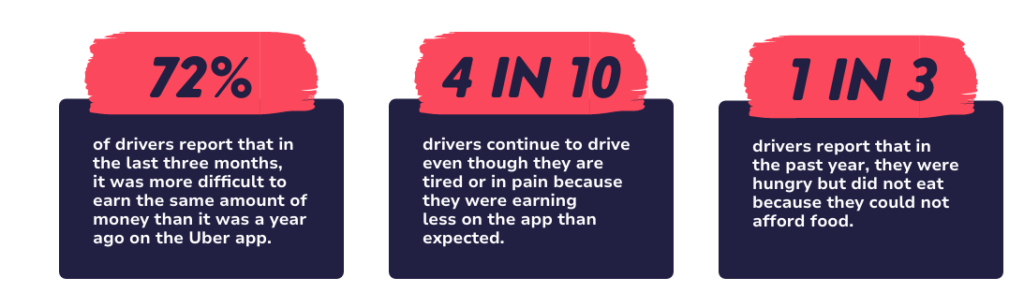
Algorithms are a convenient excuse for companies to hide behind. They won’t flat-out say that they force workers to accept low-paying gigs, but some algorithms will punish you for refusing to be exploited. There is plenty moe data where that came from, but you get the picture.
Deactivated From a Gig App: Action Checklist
If you’ve been deactivated, here is a checklist of actions to take:
1. Stay calm and do not make the situation worse
- Do not send angry messages, threats, or repeated support tickets.
- Do not create a new account unless the platform clearly allows it.
- Do not use fake documents, fake insurance, or someone else’s account.
2. Read the deactivation notice carefully
- Save the email, app message, or text notification.
- Look for the stated reason, such as:
- Background check issue
- Customer complaint
- Fraud suspicion
- Identity verification problem
- Low ratings
- Late deliveries or cancellations
- Safety issue
- Terms of service violation
3. Take screenshots of everything
Create a folder and save:
- Deactivation email
- In-app notices
- Ratings screen
- Incentive or earnings screens
- Completed trips or orders
- Any messages with support
- Background check results if relevant
4. Write down your side of the story right away
As soon as possible, note:
- What happened
- Date and time
- Which delivery, ride, or order was involved
- Names, locations, and details
- Anything that proves your version of events
This matters because details get fuzzy fast.
5. Review the platform’s deactivation and appeal policy
Check the platform’s:
- Terms of service
- Deactivation policy
- Appeal process
- Arbitration clause
- Worker account or safety policy
You want to know:
- Whether appeals are allowed
- Where to submit one
- Whether there is a deadline
- Whether arbitration is required before suing
6. Submit an appeal
When appealing:
- Be professional
- Be brief
- Stick to facts
- Ask for the exact reason if it was vague
- Attach supporting documents
Include:
- Full name
- Email tied to the account
- Phone number
- Account ID if available
- A short timeline
- Clear request for review
7. Ask for the specific evidence against you
If the reason is unclear, ask:
- Which trip, order, or incident caused the action
- Whether the issue came from a customer complaint, background check, or automated system
- Whether there is documentation you can respond to
Some platforms will say little, but it is still worth asking.
8. Check for a background check error
If the issue involves screening:
- Request a copy of the report
- Look for wrong charges, wrong person matches, old information, or dismissed cases
- Dispute errors with the background check company
- Notify the platform once the dispute is filed
This is a big one, because background check mistakes do happen.
9. Verify your documents
Make sure the platform has correct and current:
- Driver’s license
- Insurance
- Vehicle registration
- Profile photo
- Social Security number or tax details
- Banking info if needed for verification
A simple mismatch can trigger a shutdown.
10. Review recent activity for anything that may have triggered flags
Think through recent issues such as:
- Excessive cancellations
- Marking orders complete too early
- GPS mismatch
- Unusual login locations
- Using multiple phones
- Store or customer complaints
- Long idle times
- Returns, missing items, or alcohol delivery issues
Even if you did nothing wrong, this helps you respond clearly.
11. Keep records of every contact attempt
Track:
- Date
- Time
- Support channel used
- Name of rep if available
- What was said
- Ticket or case number
A simple log can help if you need to escalate later.
12. Escalate if basic support goes nowhere
Possible next steps:
- Request a supervisor review
- Use a formal appeal form if one exists
- Try platform-specific escalation channels
- Use certified mail for a formal written dispute if appropriate
- Review arbitration procedures in the contract
13. Protect your income immediately
Do not wait around with no backup plan.
- Apply to other gig platforms
- Reactivate older side hustle accounts if you have them
- Update payout details on other apps
- Look for temporary local work or part-time work
A deactivation can drag on.
14. Cash out any remaining earnings if allowed
Check whether you can still:
- Transfer earnings
- Access tax documents
- Download pay history
- See past trip or order data
Grab that information before access disappears.
15. Download tax and earnings records
Save:
- 1099 forms
- Weekly earnings statements
- Mileage or trip logs
- Bonus and incentive history
This is helpful for taxes and possible disputes.
16. Watch for retaliation or repeat account issues
If you are reinstated:
- Follow policy very closely
- Avoid gray-area behavior
- Document future problems
- Keep screenshots of performance metrics
17. Consider legal help in stronger cases
It may be worth talking to a lawyer if:
- The deactivation was based on false accusations
- A background check error cost you income
- The company ignored its own appeal process
- There may be discrimination or retaliation
- Large unpaid earnings are involved
18. File complaints where appropriate
Depending on the issue, a person may consider:
- Background check dispute with the screening company
- Consumer complaint with their state attorney general
- Federal Trade Commission complaint
- Better Business Bureau complaint
- Private arbitration if required by contract
19. Be careful with social media posts
- Do not post threats or personal attacks
- Do not publish customer information
- Do not admit to policy violations publicly
- If posting publicly, stick to facts
20. Build a backup plan going forward
After this is resolved, it is smart to:
- Avoid relying on one app only
- Keep accounts active on multiple platforms
- Track mileage and screenshots regularly
- Save copies of policies and communications
Legal Help
Many local bar associations in the U.S. offer free lawyer referral services. This free service often allows for a free consultation. Clock on the hyperlink to visit. Additionally, contact your local Neighborhood Legal Services and your local United Way for more help. To contact your local United Way, you can also call or text 2-1-1.
Remember, you have rights! Don’t be afraid to fight back if you’ve been unfairly deactivated!